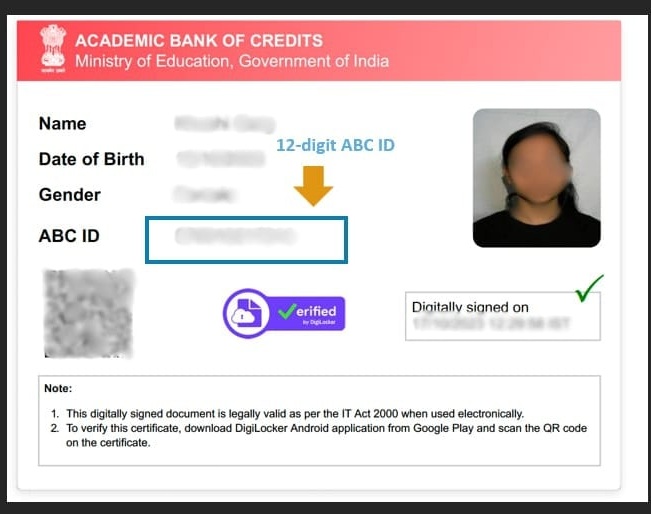
If you are an IGNOU student, you may have seen ABC ID or APAAR ID while filling out an admission or Term-End Examination (TEE) form.
The ABC system keeps a digital record of academic credits earned by students. IGNOU states that students are required to create an ABC ID while filling the Term-End Examination form so their grades/marks can be reflected in the Academic Bank of Credits and DigiLocker.
In this guide, we will explain what an ABC ID is, why IGNOU students need it, how to create it, and how it is connected with IGNOU.
What is an ABC ID?
ABC stands for Academic Bank of Credits.
It is part of India's digital academic system and allows academic credits earned by students to be stored digitally.
When a student registers with the Academic Bank of Credits, an APAAR ID is created. This ID can be provided to educational institutions so that academic credits can be added to the student's ABC account.
IGNOU describes the APAAR/ABC ID as a unique 12-digit code used to store, manage and access academic records and credits.
Is ABC ID and APAAR ID the Same?
Students often get confused between ABC ID and APAAR ID.
In current academic systems, you will commonly see the identifier referred to as the APAAR/ABC ID. IGNOU itself uses wording such as “APAAR/ABC ID” in its instructions.
So, when IGNOU asks you for an ABC ID, you may see your APAAR ID used for this purpose.
Why Do IGNOU Students Need an ABC ID?

The ABC system helps maintain a digital record of academic credits.
For IGNOU students, it is particularly important because IGNOU states that students filling the Term-End Examination form are required to create an ABC ID. Without it, grades or marks may not be reflected in the Academic Bank of Credits/DigiLocker and it may affect timely result processing.
The ID can also help connect academic records with services such as DigiLocker.
How to Create ABC ID for IGNOU Students
You can create your APAAR/ABC ID through the official digital academic services.
Step 1: Create or Sign In to DigiLocker
Open DigiLocker and sign in to your existing account.
If you do not have an account, create one and complete the required verification.
Step 2: Find the APAAR/ABC Service
After signing in, look for the APAAR ID / Academic Bank of Credits service.
You can also access the Academic Bank of Credits through its official portal.
Academic Bank of Credits official portal
Step 3: Complete the Required Details
Follow the instructions displayed on the portal and provide the requested information.
Make sure your personal information is correct, especially your name and other identity details. Incorrect or mismatched details can cause problems when academic records are connected with your account.
Step 4: Generate Your APAAR/ABC ID
Complete the verification process.
After successful registration, your 12-digit APAAR/ABC ID will be generated.
Save the ID carefully because you may need it while using IGNOU services.
How to Link ABC ID with IGNOU
There is an important point here: students may expect a separate permanent “Link ABC ID” button inside IGNOU, but the process depends on the IGNOU service you are using.
For example, IGNOU's current Term-End Examination instructions require students to provide/create their ABC ID while filling the examination form. IGNOU's instructions ask for details such as whether the student has an ABC ID and the ABC ID itself when applicable.
Therefore, when an official IGNOU form asks for your ABC/APAAR ID, enter your 12-digit ID carefully and verify it before submitting the form.
Do not enter another student's ID.
How to Check Your ABC Academic Credits
After creating your account, you can use the ABC portal to check whether academic credits are available in your account.
The National Academic Depository states that students can register on the ABC portal to verify the availability of credits in their ABC account.
Keep in mind that creating an ABC ID does not necessarily mean all your IGNOU credits will immediately appear. Academic information has to be submitted and processed by the institution.
ABC ID Not Showing IGNOU Credits?
Do not immediately create another ABC ID.
First, check that you are using the correct account and that your details match your academic records.
Credits or documents may not appear immediately if the relevant academic data has not yet been uploaded or processed. DigiLocker explains that educational records are available when the relevant institution has provided them to the National Academic Depository.
If the issue continues, use the official APAAR support system or contact the appropriate IGNOU support channel.
Common Problems While Creating ABC ID
Name or Details Do Not Match
Use the correct information requested during verification. Your identity details should be consistent with your official records.
Already Have an ABC/APAAR ID
Do not create multiple IDs unnecessarily. Use your existing ID when IGNOU asks for it.
Credits Are Not Visible
This does not automatically mean your ABC ID is incorrect. Academic records may need to be uploaded or processed by the institution before they become visible.
Cannot Create the ID
Check the details you entered and complete any required identity verification. For unresolved problems, contact the official APAAR Support Center.
Is ABC ID Mandatory for IGNOU?
For the Term-End Examination process, IGNOU's current June 2026 examination instructions state that students are required to create an ABC ID; otherwise their grades/marks will not be reflected in ABC/DigiLocker and this may affect timely declaration of results.
Students should always check the latest official IGNOU instructions for the specific admission, examination or academic process they are completing.
Frequently Asked Questions
What is the full form of ABC ID?
ABC stands for Academic Bank of Credits.
How many digits are in an ABC ID?
IGNOU describes the APAAR/ABC ID as a 12-digit unique code.
Is APAAR ID the same as ABC ID?
The systems are closely connected. Registration with ABC generates an APAAR ID, and IGNOU documentation also uses the term APAAR/ABC ID.
Can I create ABC ID online?
Yes. Students can use the official digital services associated with ABC/APAAR and DigiLocker.
Do I need to create a new ABC ID for IGNOU?
If you already have a valid APAAR/ABC ID, you generally should not create another one simply because you joined IGNOU. Use your existing ID when the university asks for it.
Why are my IGNOU credits not showing?
There can be a delay between completing academic requirements and the corresponding records appearing digitally. Check your details and allow for institutional processing before assuming there is a problem with your ID.
Final Words
The APAAR/ABC ID is becoming an important part of the digital academic system for IGNOU students.
Create your ID through official services, keep the 12-digit number safe, and provide it accurately whenever an IGNOU form asks for your ABC/APAAR ID.
For examination-related requirements, always check the latest instructions on the official IGNOU examination portal before submitting your form.
Disclaimer: IGNOU procedures and government digital academic services can change over time. This guide is for informational purposes and was checked against official information available in July 2026. Always verify important requirements on official IGNOU, ABC/APAAR and DigiLocker portals.